

Your favorite editing software stutters, and complex 3D renders crawl at a glacial pace on your thin notebook. You bought a compact machine for portability, but now your demanding creative workload demands desktop-grade power.
That performance bottleneck disappears the moment you connect a usb c external gpu. You gain serious rendering muscle without replacing your entire computer setup.
Let us break down the hardware configurations that actually deliver on that promise.
Key Takeaways
- Match the bandwidth speed of your connection protocol to the demands of your graphics card to avoid severe performance loss.
- Verify the power delivery wattage to ensure your laptop charges reliably while driving heavy GPU loads.
- Check the physical enclosure size before purchasing to guarantee your specific graphics card fits the interior dimensions.
- Decide between Thunderbolt and OCuLink depending on whether you prioritize hot-swapping convenience or raw data transfer speeds.
- Assess your power supply unit compatibility because some docks require separate purchases while others include standard internal units.
| Ultimate Desktop Powerhouse |  |
Razer Core X V2 Enclosure | Massive card compatibility | High power delivery | Modern connectivity standards | View on Amazon | Read Review |
| Versatile Budget Solution |  |
PCIE 3.0 eGPU Dock | Multiple power supply options | Included Thunderbolt cable | Compact open-air design | View on Amazon | Read Review |
| Enthusiast Open Frame |  |
Minisforum DEG1 OCuLink Dock | Standard PSU support | High-end GPU compatible | Direct OCuLink connection | View on Amazon | Read Review |
| Speed Demon Adapter |  |
OCuLink PCIe 4.0 eGPU Dock | Maximum bandwidth speeds | PCIe 4.0 support | Minimalist footprint | View on Amazon | Read Review |
| Cable Included Kit | 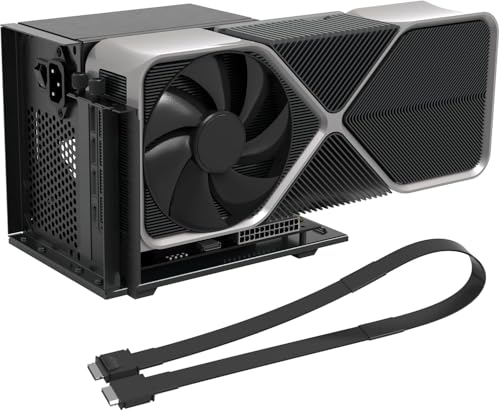 |
OCuLink SFF Cable eGPU Dock | Long SFF cable included | Mini PC friendly | Fast data transfer | View on Amazon | Read Review |
| Compact Daisy Chainable Hub |  |
Mini eGPU Enclosure Dock | Daisy chain support | Built-in power delivery | Compact mini footprint | View on Amazon | Read Review |
| Streamlined Laptop Accelerator |  |
Goldsoun External eGPU Dock | Reliable port compatibility | Clean desktop charging | Simple plug-and-play setup | View on Amazon | Read Review |
| Portable Graphics Bridge |  |
Mini eGPU 40Gbps Enclosure | Highly portable design | Broad port compatibility | Solid 40Gbps throughput | View on Amazon | Read Review |
More Details on Our Top Picks
-
Razer Core X V2 Enclosure
If you want to turn your thin laptop into a heavy gaming rig without compromises, this is your primary target. It houses massive four-slot cards with ease, giving you full access to top-tier NVIDIA or AMD hardware.
Power delivery is a major strength here, pushing 140W through USB-C to keep even demanding workstations fully charged. You do pay for that premium footprint with a bulky aluminum chassis that takes up serious desk space.
- Brand:Razer
- Connection Type:Thunderbolt 4/5 and USB 4
- Power Delivery:140W PD
- Form Factor:Enclosure
- Graphics Support:NVIDIA and AMD PCIe 4.0
-
PCIE 3.0 eGPU Dock
Budget-conscious builders will appreciate this accessible dock for connecting desktop graphics cards to laptops or consoles. It relies on a Thunderbolt 4 cable to bridge the performance gap between portable machines and discrete GPUs.
Flexibility stands out through multiple power supply options, including CPU, Molex, and DC inputs. Speeds max out at PCIe 3.0 levels, so you miss out on the absolute fastest data rates available on newer hardware.
- Connection Type:Thunderbolt 4
- Form Factor:Dock
- Graphics Support:NVIDIA and AMD
- Bandwidth Speed:22Gbps
-
Minisforum DEG1 OCuLink Dock
This open-air dock caters directly to enthusiasts running power-hungry cards like the RTX 4090 or top AMD equivalents. It supports standard desktop power supplies, keeping your power routing clean and straightforward.
Using an OCuLink expansion connection allows you to bypass traditional bottlenecks for raw data throughput. You lose the physical protection of a closed chassis, leaving your components exposed to dust.
- Brand:Minisforum
- Connection Type:OCuLink
- Form Factor:Dock
- Graphics Support:RTX 4090, RX 7900 XTX
-
OCuLink PCIe 4.0 eGPU Dock
Performance purists chasing the highest possible bandwidth will find a lot to like in this specialized adapter. It leverages PCIe 4.0 x4 lanes to push data at 64Gbps, minimizing the usual external graphics penalty.
The barebones design focuses entirely on raw data transmission without extra frills or bulky metal housings. You must supply your own power unit and manage the exposed circuit board carefully on your desk.
- Connection Type:OCuLink
- Form Factor:Dock
- Graphics Support:PCIe x16 cards
- Bandwidth Speed:64Gbps
-
OCuLink SFF Cable eGPU Dock
Getting your external setup running quickly is much easier when the necessary cabling comes right in the box. This kit includes a generous 19.7-inch SFF-8611 cable for flexible positioning next to your mini PC or laptop.
Data speeds reach 64Gbps over PCIe 4.0, ensuring your graphics card performs close to desktop levels. Assembly requires patience since you are building an open system from loose components.
- Connection Type:OCuLink SFF-8611
- Form Factor:Dock
- Graphics Support:PCIe x16
- Bandwidth Speed:64Gbps
- Additional Feature:19.7-inch SFF cable included
- Additional Feature:External GPU enclosure style
-
Mini eGPU Enclosure Dock
If desk space is at a premium, this compact enclosure keeps your workstation tidy while boosting graphical output. It supports Thunderbolt 3, 4, and USB4 connections alongside a handy 85W power delivery feature for your host machine.
Daisy chaining lets you connect multiple devices without running out of ports on your laptop. The interior space is strictly limited, meaning oversized graphics cards will not fit inside the shell.
- Connection Type:Thunderbolt 3/4, USB4
- Power Delivery:85W PD
- Form Factor:Mini Enclosure
- Graphics Support:NVIDIA and AMD PCIe
- Bandwidth Speed:40Gbps
- Additional Feature:DC, ATX, SFX, and Flex support
-
Goldsoun External eGPU Dock
Professionals needing extra graphics horsepower on the go will appreciate this straightforward docking station. It connects reliably via Thunderbolt and USB4 ports, transforming standard ultrabooks into capable editing machines.
The unit supplies 85W of charging power, eliminating the need for a separate laptop brick on your desk. Fan noise can become noticeable under heavy GPU loads.
- Brand:Goldsoun
- Connection Type:Thunderbolt 3/4, USB4
- Power Delivery:85W PD
- Form Factor:Dock
- Bandwidth Speed:40Gbps
-
Mini eGPU 40Gbps Enclosure
Frequent travelers who refuse to compromise on graphics performance will find this portable enclosure very appealing. It utilizes 40Gbps bandwidth to squeeze solid framerates out of external desktop cards.
Compatibility spans across modern Thunderbolt and USB4 systems, making it future-proof for most modern port configurations. Thermal management is tight, so cooling fans run fast and loud during extended gaming sessions.
- Connection Type:Thunderbolt 3/4, USB4
- Form Factor:Mini Enclosure
- Bandwidth Speed:40Gbps